Drop anything, anywhere.
Audio, video and images straight into the list — even between two cues. Drag to reorder, drop to place.
Ready to Cue
House lights down.
Prologue
Italian for “let’s give the A” — the note that starts everything.
In an orchestra the A comes first. Everyone tunes to it, then the show can begin. In the booth it’s the same: someone has to give the cue.
La Cue is the cue player for whoever is on the button. Drag in your files, shape them on the waveform, press GO. It takes care of the rest.
The real thing
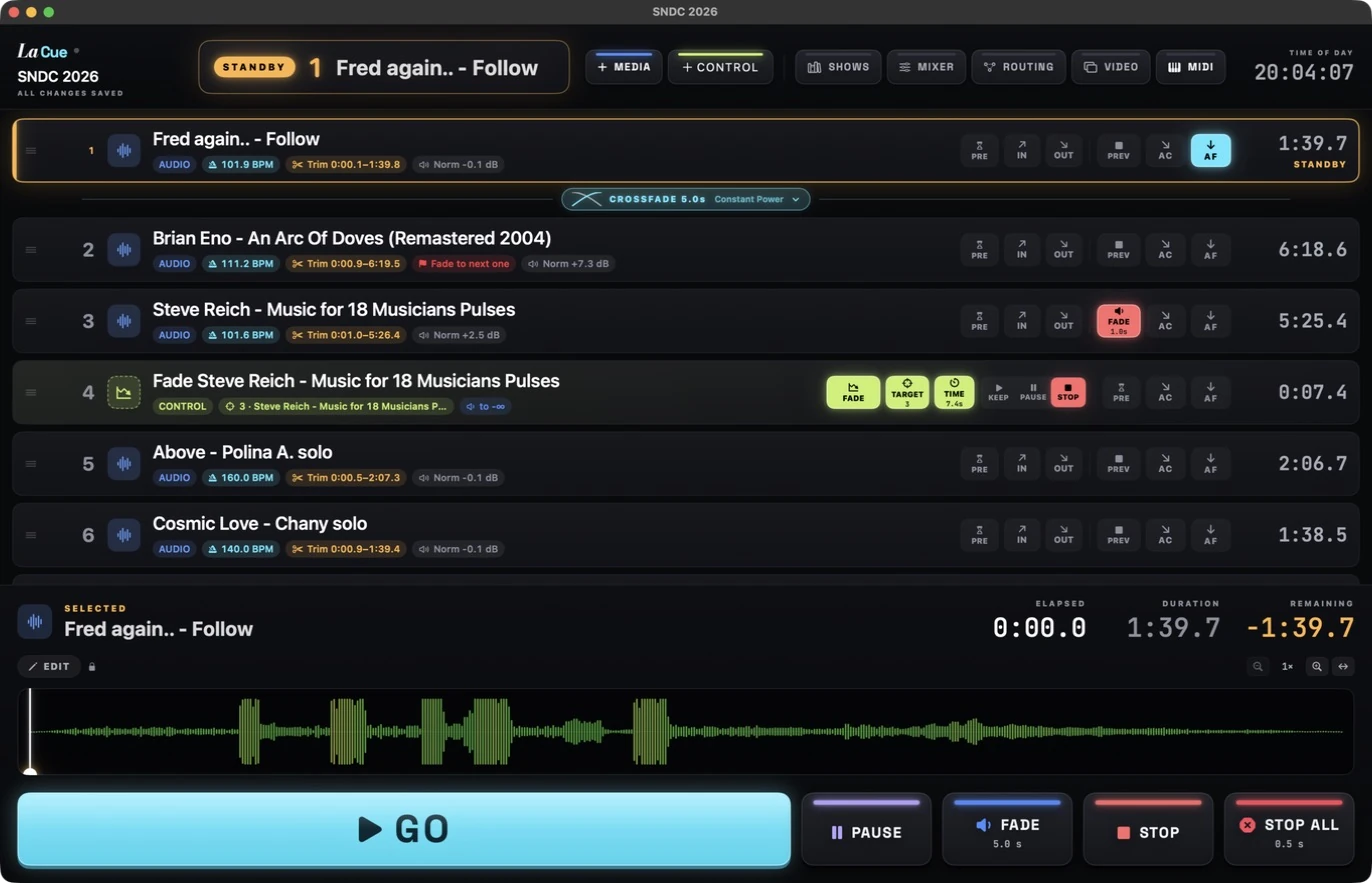
Act I · Opening night
The audience settles. Cue 1 is on standby.
 LaCue
Dress rehearsal · 4 cues
Act II · The sound
Act III · The mix New
Act IV · The remote New
QR code renews every 3 min · own key per device · viewers can’t send commands · local network only
Scan with any camera · 0 devices
Act V · The booth
Nothing you don’t. Every control is where you expect it — in the dark, on opening night.
keep scrolling →Audio, video and images straight into the list — even between two cues. Drag to reorder, drop to place.
Click, ⌘-click, ⇧-click, ⌘A. Change a fade, a curve or a level once — it applies to every selected cue. Copy and paste them all.
Each cue decides what to do with the ones above it when it fires: stop, stop all, fade or fade all — with its own fade time.
A cue that controls another: fade cue 3 to silence over 7.4 seconds, stop it, pause it. Fire it with GO like any other.
Linear, S-curve, fast or slow start. Constant power is the default: same perceived loudness all the way through.
Chain cues with waits and automatic starts. Auto-follow crossfades into the next one. Complex sequences, one GO.
Video cues show a filmstrip above the audio waveform. Fades work on picture and sound; audio is normalized too.
F fades everything with your global fade time. Stop All can fade too — press it twice and everything stops. Instantly.
Add outputs, set each one stereo or mono, test and mute them. Send every cue where it belongs — Dante Virtual Soundcard included.
Click a control, press a key, pad or fader on your controller. Done — GO, Fade, Stop All and the faders are now under your fingers.
Automatic numbering, or type your own: 12, 12A, 12B. The way your stage manager calls them.
The .lacue file and its Media folder travel together, with relative paths. Auto-saved. Double-click and you’re on.
Act VI · Eyes on stage
Every action is one key away. Try them — press them now.
In Edit mode, Space auditions the selected cue — without touching the live show.
When you’re ready…
I’ve lived backstage. In the dark, headset on, one hand on the fader and both eyes on the stage — counting, waiting, breathing with the show. Nobody in the audience knows your name. But miss one cue, and everyone knows.
I built La Cue for the people who live there: the operators, the stage managers, the student running their very first show. They deserve tools that are clear, calm and kind — not another subscription.
So La Cue is free. It’s my thank-you to everyone behind the scenes.
The cue player for whoever is on the button.
For theatre, events and schools, on Mac. Free.
Version 1.0 (build 63) · macOS 13 Ventura or later · Apple Silicon · 4.6 MB
Or install with one line — paste it in Terminal:
curl -fsSL https://lacue.app/install.sh | bashDownloads the latest version, puts La Cue in Applications and opens it. No extra steps. Also the easiest way to update.
First launch: unzip, drag La Cue to Applications and open it. If macOS stops it, go to System Settings › Privacy & Security and click Open Anyway — only the first time.